Friday, April 11, 2014

Topaz Labs Detail SALE


Flawless detail and perfect photo sharpening with Topaz Detail detail enhancement software

Topaz Labs Detail SALE

50% Off April 10-30, 2014 NOW $19.99 w/ discount code "aprdetail".  Regular price $39.99

Create tack-sharp and highly detailed photos by enhancing natural sharpness and taking full control over image detail.Topaz Detail helps photographers get tack-sharp images that "pop". Here are the main benefits of using it:

• Better control over image detail. Detail uses size-based processing that lets you independently adjust small, medium, and large details.
• More natural images. The technology in Detail substantially reduces the halos and artifacts you get from over-sharpening.
• More volume and three-dimensionality. Detail can enhance larger image features to increase the perceived "depth" of your photo.

Topaz Detail puts unique detailing capabilities right at your fingertips. Built with one-of-a-kind technology, this plug-in is invaluable for photographers who want precise and intricate detailing abilities that will help achieve high-quality enhancements. Detail breaks down an image into three levels of internal detail separation and three levels of tone separation. What makes it stand apart from other similar tools is the flexibility and control that allows you to selectively enhance or remove detail throughout your image without the side effects of halos or artifacts. You can see some examples on the product page: http://www.topazlabs.com/detail


Friday, March 28, 2014

Pro-Tip #16: Get Creative with Magic Lantern

This year in my Pro-Tip section I am writing about ways to get creative so your images will standout from the other 880 billion photos that are expected to be taken in 2014. Magic Lantern (ML) is one of those tools to help accomplish that goal. Magic Lantern (ML) is a FREE software add-on that runs from the SD/CF card and adds a host of new features to Canon EOS cameras that weren't included from the factory by Canon. Developed by independent film makers in their spare time ML augments the factory settings and features with a plethora of new features including: 
  • Audio: disable AGC, audio meters, manual audio controls, selectable input source (internal, internal+external, external stereo, balanced), audio monitoring via A/V cable.
  • Exposure helpers: zebras, false color, histogram, waveform, spot meter, vector scope.
  • Focus tools: focus peaking, zoom while recording, trap focus, rack focus, follow focus, focus stacking.
  • Movie helpers: Bit rate control, movie logging (Exif-like metadata), auto-restart after buffer overflow or 4 GB limit, HDR video, advanced FPS control.
  • LiveView adjustments: contrast, saturation, display gain for using LiveView in darkness. Cropmark images: user-editable overlays to assist framing and composition.
  • Fine control for ISO, Shutter, Kelvin white balance and other image settings.
  • Bracketing: advanced exposure bracketing, focus stacking.
  • Remote release with LCD face sensor and audio trigger, without extra hardware.
  • Timelapse: intervalometer (for photos and movies), bulb ramping (manual and automatic), recording at very low FPS (down to 0.2 FPS), silent pictures without shutter actuation.
  • Astro- and night photography: bulb timer for very long exposures (up to 8h).
  • Info displays: focus and DOF info, CMOS temperature, shutter count, clock.
  • For strobists: flash exposure compensation, range up to -10 to +3 EV (depends on the camera).
  • Power saving: Turn off display or reduce backlight in LiveView during idle times.
  • Handy features: Quick zoom in PLAY mode, key shortcuts for commonly-used features, customizable menus.
  • And much more!
Some of the features I use regularly are:

Auto Exposure Bracketing - I particularly like the added control when shooting Auto Exposure Brackets with ML managing the shoot sequence you can take up to 9 shots with +/- 0.5 to 5 EVs between exposures with a single press of the shutter button.  Additionally, ML will add a 2 second timer delay to the start of the sequence and lock the mirror up to reduce sources of vibration.

Intervalometer - Having a built-in intervalmeter is great for taking timelapse sequences where you can set the start delay, duration between shots and stop after X number of pictures. It also works in Movie Mode and allows you to set the duration of the movie clip.

Stack Focus - This selection will shoot a series of photographs with varying focus points. It is used in macro photography to assemble sharper final images by merging photos where each has a different focus point. I use it on landscape images where I am extremely close to my foreground and I want it to be in sharp focus as well as the distant background elements.

Motion Detection Triggers - Trigger modes to choose from: Exposure Change: it only reacts to brightness changes. Detects large moving subjects which cause significant change in exposure or Frame Difference: it computes the difference between the last two frames A and B (luma channel only); this detects smaller movements which do not change exposure. Detection time is somewhere between 200 and 300 ms. Great for wildlife camera traps, lightening shoots, or taking images of the family pet when you are away.

I could go on but it would be better if you download ML and read the 56 page user manual which covers all the upgrades you will get for FREE.  You can download this program at www.magiclantern.fm  The added features that ML brings to your disposal will provide you with many new ways to step up your photographic game and get those shots other photographers would never think about due to the limitations of their factory equipment.

Tuesday, February 25, 2014

Pro-Tip #15: Get Creative: Finding Interesting Sky

Rolling Sand Dunes © Greg Clure
 
This year in my Pro-Tip section I am writing about ways to get creative so your images will standout from the other 880 billion photos that are expected to be taken in 2014. An easy way to turn an ordinary image into an extraordinary image that stands out from others taken in the same location is by finding some interesting sky.  Finding and including interesting sky in your image can often move your image up to the next level, so I have assembled some tips and tools to help you in this endeavor.
  1. Timing - Time your visit to when a storm is rolling through your chosen location. Often, right before or right after a storm rolls through you will find your best opportunity for capturing dramatic skies. While this is the best way to ensure you have an interesting sky to work with it may not always be that practical.  This works if you live nearby the scene you are shooting and can be on-site in short order, but does not work if you are traveling a long way from home.  If far from home, time your visit to a part of the calendar year where storms are more common and more frequent which increases your odds of being on site for dramatic skies.
  2. Weather Apps - These days you can get great information on advancing storms on your smart phone. Apps like AccuWeather or WeatherBug offer tons of weather information in the palm of your hand and can help decide where and what you should be shooting over the next few days.  I especially like the radar maps which show advancing cloud cover. Check the weather regularly and adjust your shooting schedule accordingly.
  3. Compose with the Sky in Mind - The rule of thirds will have you put your horizon line one-third up from the bottom or down from the top. If you have a dramatic sky than the upper two-thirds or even more can be dedicated to the sky.  This puts importance on the sky as your center of interest and is effective in telling your story of the drama in the sky.
  4. Use Filters - Polarisers are great for darkening up the blue in the sky and adding extra contrast pop to the clouds in the sky.  You might also need to use a graduated neutral density filter to bring down the brightness of your sky should the the dynamic range be to great for a single exposure. If your clouds are moving, you might consider using a streight netural density filter to lentghen your shutter speed and accentuate the clouds streaking across the sky as discused in Pro-Tip #14.
  5. Clear Blue Sky Strategy - Sometime Mother Nature is just not going to cooperate with your need for clouds and provides clear blue skies.  If you do need to include the clear blue sky in your composition you should work to minimize it as much as possible. Another strategy would be to switch gears and exclude the sky altogether from your compositions. Look for more intimate scenes or macros in areas of full shade to avoid the typical harshness that comes along with clear blue skies. You can also go out at sunrise or sunset where you can get some color (other than blue) from the low angle sunlight for your cloudless grand scenic shots.
  6. Dress for the Conditions - Dress in layers that you can adjust to the changing weather conditions. You are out in unstable weather so you need to be prepared for anything that might come your way. It can be clear, warm and sunny and turn cool, dark and rainy in a matter of minutes when a cold front rolls through.  Protect yourself and your gear with the appropriate covers should you get caught out in the storm. If you do get caught in the storm, seek shelter as soon as possible and be ready to return to your shoot location when things begin to clear.
Hopefully, you can use some or all of these tips to increase your odds in finding and capturing more interesting skies on your next photo outing.

Sunday, February 16, 2014

Simply Amazing! Try it for Free!

50% Off Until 2/28, NOW $19.99
w/ discount code "febsimplify"
Regular price $39.99

banner


The Topaz Simplify plug-in allows you to create stunning art from photos by transforming regular digital images into beautiful works-of-art. With Simplify, you can achieve a variety of creative art effects including: watercolors, textured oil paintings, cartoon-like images, abstracts, charcoal drawings, line art, and photo-realistic paintings - giving your photography a true creative edge.

The unique size-based technology in Topaz Simplify processes your photo in the same way a true artist would: it eliminates detail-clutter and leaves behind only the essence and natural structure of the photo. By selectively removing unnecessary image clutter, Simplify helps you create a bold and powerful piece of art in just a few clicks.

Thursday, February 13, 2014

Topaz Labs Simplify - 50% Off Sale

50% Off Until 2/28, NOW $19.99
w/ discount code "febsimplify"
Regular price $39.99

Digital Art and Painting

The Topaz Simplify plug-in allows you to create stunning art from photos by transforming regular digital images into beautiful works-of-art. With Simplify, you can achieve a variety of creative art effects including: watercolors, textured oil paintings, cartoon-like images, abstracts, charcoal drawings, line art, and photo-realistic paintings - giving your photography a true creative edge.

The unique size-based technology in Topaz Simplify processes your photo in the same way a true artist would: it eliminates detail-clutter and leaves behind only the essence and natural structure of the photo. By selectively removing unnecessary image clutter, Simplify helps you create a bold and powerful piece of art in just a few clicks.

Here's an example using one of the available pre-sets, just with one click of the mouse, I went from a detailed photograph to a less detailed more painterly watercolor look. The possibilities are endless as there are tens of thousands of variations possible.

Original
Topaz Simplify Watercolor Pre-set Applied


As with any Topaz product you can try it before you buy it, download a free 30 day trial version to see if Topaz Simplify is right for you.

Better yet, if you are new to Topaz, this product is included in their Complete Collection where you get all 14 Topaz products at a super discount, use my discount code, gclure and save an additional 15% off the Complete Collection.

Friday, January 31, 2014

Pro-Tip #14: Get Creative: Long Exposure Photography


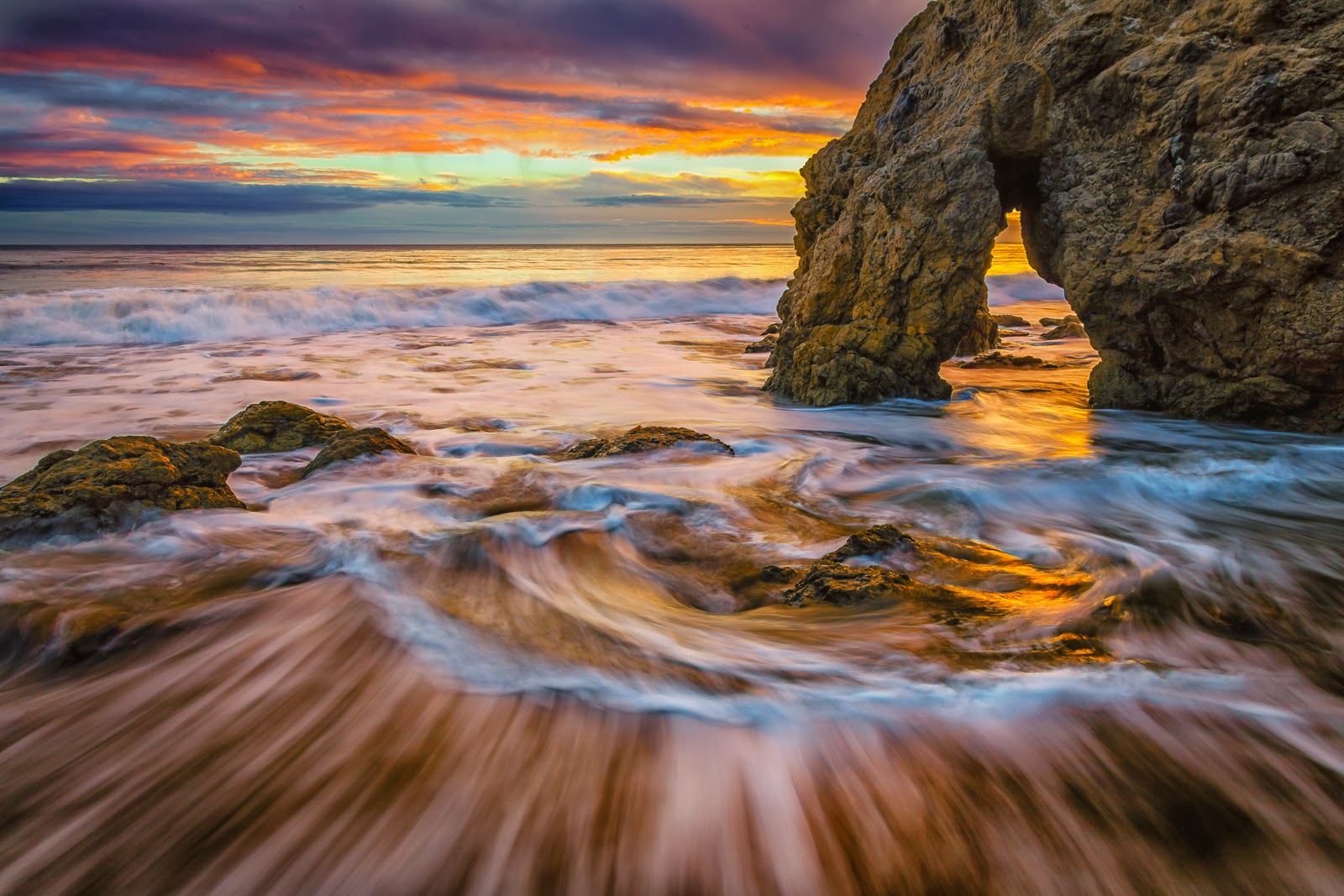
Golden Arch Sunset - f/13@30 sec., 9 stop ND filter


     Last month's Pro-Tip was about getting creative so your images will standout from the other 880 billion photos that are expected to be taken in 2014. An easy way to turn an ordinary image into an extraordinary image that standout from others taken in the same location is with long exposure photography. So what is it and how would it make my photos stand out?
     A long exposure can be thought of as any shutter speed where the photographer cannot hand hold the camera without getting unwanted blur due to camera shake.  These are typically shutter speeds longer than 1/30th or 1/15th of a second.  The aim of long exposure photography is to introduce some creative blur as a result of a moving subject.  Moving water is a classic subject of this technique as are star trails and traffic head and tail lights.
     A couple of pieces equipment will be need to help you capture long exposures; 1) A camera support, typically a tripod, will be needed because hand holding your camera will not be possible, and; 2) A neutral density (ND) filter will be useful in photographing brighter scenes and allow you a choice of longer shutter speeds.
     What camera settings should I use for the best blur? Well, this is where taste and personal choice come into the creative process.  Blur will be affected by three major factors, 1) Speed of your moving subject, 2) The distance between your lens and moving subject, and; 3) Shutter speed. Because you are looking for long exposures you will typically be setting your ISO to its lowest setting and your aperture will typically be closed down to its smallest setting which will give you the slowest possible shutter speed for your lighting condition.  If you are unable to get a slow enough shutter speed you can add a ND filter.
     Personally, I like to try various shutter speeds as each will give a different look and feel to the moving subject and it is hard to tell which you might like best by looking at the back of your camera.  The above image was a 30 second exposure but I took others from 0.3 seconds to 20 seconds and liked the results of several others in addition to this one.  You can see the others in my on-line gallery at Greg Clure Photography.
     My intent is not to provide you with everything there is to know about long exposure photography, as books have been written on the topic, but rather to get you to think about using it as a means of getting a different result and ultimately a better result than the standard fast shutter speed snap shots that will be taken by others. Be creative with slow shutter speeds and capture some unique and more interesting images.