Wednesday, July 31, 2013

Topaz ReStyle, New Product Available Aug. 8th


Topaz ReStyle lets you explore new artistic and creative possibilities for your images and helps you achieve looks you might not have thought of otherwise. Transform your images with just one click using over a thousand easily searchable styles and looks.ReStyle offers inspiration through exploring the unending possibilities included in this product, and as a result, you can quickly achieve your vision or even extend and enhance the original vision for your image.

Here are some of the unique features introduced in Topaz ReStyle:
  1. Breakthrough Mapping Technology. ReStyle introduces a cutting-edge process of mapping color and tone statistics from a selected style to a target image. This newtechnology creates high-quality transformations, even for dramatic styles and looks.
  2. New Style/Preset Creation Method. ReStyle creates presets using a source image’s color and tones, allowing you to save your own unique styles to use later.
  3. Blending Modes. With ReStyle, we have incorporated blending modes for the adjustment modules, essentially showing 8 different looks for each style preset.
  4. HSL Technology in 5-Color Style Sliders. Easily enhance your selected style’s 5 dominant colors using the unique hue, saturation and luminance controls.
  5. Advanced Masking Workflow. The masking module, attached to each adjustment tab, contains a comprehensive set of tools including an edge-aware brush, gradient mask, smart feather tool, color aware tool and more.
  6. User Interface Design. With ReStyle, we have continued to develop a cleaner, more modern and efficient interface to improve usability, workflow and overall aesthetics.
Topaz ReStyle will release on August 8th and retail for $59.99, but will be on sale for $29.99 through August 31st with this discount code: restyleit. Click the "Get It Now" button at the top of this post and start downloading it now.

Better yet, if you are new to Topaz, this product will be included in their Complete Collection where you get all 14 Topaz products at a super discount, use my discount code, gclure, and save an additional 15% off the Complete Collection.


Pro-Tip #8: My First Rule of Creating Stunning Images (aka Composition)


Sunlight Ripples, Blue Lake -- © Greg Clure Photography

If you want stunning images you must go to stunning locations, if you are a landscape photographer. If you shoot portraits, a good location is great but you need good looking (stunning) people.  The same rule applies to any genre of photography, subject matter, matters!  Does the subject have impact? If the first thing someone says when they see your image for the first time is, "WOW, you took that?", you know you have captured something special.  That WOW factor or impact should be your number one objective to creating stunning images.  Many other compositional factors go into making stunning images but this one should always be at the top of your list. If I want to create stunning landscape images, I need to leave my backyard, not that I can't get some good stuff back there but it's no Yosemite Valley.  I do take images in my backyard, I call it practice. Just like any craft, sport or hobby, practice makes perfect and prepares you for the time you are in that stunning location or have a beautiful model to shoot.  I most likely will not be hanging any of my practice shots on my wall but I would rather experiment and hone my technique in my backyard so I know what to do without even thinking about it when the light is perfect in my stunning location.  The last thing you want to be doing is honing your technique when a spectacular event appears before you and quickly fades while you are still trying to figure out what the best settings are to capture the scene you just missed. Case in point, my "Sunlight Ripples" image featured in my Images of the Month gallery was a phenomena that lasted less than 30 seconds with the light peaking for less than 10 seconds. Had I been honing my technique I would have missed it, but what wasn't missing was the stunning location.  Blue Lake in the Eastern Sierras with dramatic storm clouds building, I was set-up in a beautiful location when the sunlight ripples appeared making this already stunning location even more unique with an event not likely to be repeated or captured by the next would be photographer who wonders by this location. Some might say you were just lucky to be in the right place at the right time, and I would agree had I not been set-up and taking shots and working the location to find compositions I liked for the two hours prior to this event. With weather, luck will always be a factor, but luck will always favor the prepared. Keep this rule top of mind when you go looking for your stunning location.

Friday, July 12, 2013

Topaz Labs Lens Effects, 50% Off, July 16-31

Topaz Labs is running a special promotion for 50% off Lens Effects ($79.99 to $39.99) from July 16th- July 31st, use promo code: julylens.  They will also have a great line up of webinars on Lens Effects over the next two weeks where you can learn what this plug-in is all about, at Topaz Labs Webinars

Here is the upcoming Lens Effects webinar schedule:
Monday July 15th at 4:00pm CST- Realistic Lens Filter Simulations
Thursday July 18th at 2:00pm CST- Quick Tip Thursday- Create Realistic Fog
Tuesday July 23rd at 3:00pm CST- Specialty Lens and Camera Effects
 
Lastly, I also wanted to make you aware that Topaz has changed the way they sell their suite of products. They have removed the product known as the Topaz Bundle, which included 10 of their products and replaced it with the Topaz Complete Collection, which now includes all 13 of their products including the host program PhotoFXLab. The price for this is $349.99, a $360 savings over purchasing each product seperately.

Now for an Overview of Topaz Lens Effects

  • Realistic Depth of Field simulation
  • 1-click focal point selection
  • Traditional and Creative filters - offering convenience and major savings
  • Specialty Camera Effects. Explore and apply unique effects without additional equipment costs


Your Virtual Camera Bag

Simulate realistic filters and lenses for unique focal point flexibility and creative focus effects in your images.
Topaz Lens Effects brings all of your camera lenses and filters (and even those you don't have yet) together in a powerful and easy-to-use plug-in, eliminating the need for additional and expensive equipment, while providing unparalleled editing flexibility. The diverse range of effects made possible by virtual simulation of common lenses, filters and specialty cameras make it easier than ever to change or emphasize focal points, adjust depth-of-field, add vignettes, balance color tone, create miniature scenes and so much more.


Lens Lineup

Lens Effects Highlights

  • Explore, experiment with and apply 29 effects and over 200 presets
  • Bokeh, (blur) to minimize undesired backgrounds and foregrounds
  • Filter characteristics like color tone, fog, reflector and more
  • Flexibility to enhance or change your focal point
  • Creative focus effects like motion, miniatures and dual focus
  • Depth-of-field adjustments with depth map and Smart Brush
  • "Apply" button to stack effects and create customized looks
  • Separate controls for adjusting background and foreground details
  • Enhanced sharpening algorithm, grain, quad toning and vignettes


Flexibility After the Shot

Traditionally, most lens and filter effects are interposed at the time of the shot. However, Lens Effects extends the functionality beyond your camera, giving you the convenience and flexibility to add any number of filter, lens, hood and specialty-camera adjustments after the shot. This type of control helps simplify your shooting process by simulating the abilities of your camera equipment inside of Photoshop. Lens Effects offers a more effective way to explore the many benefits that traditional lenses and filters offer - in just a click.

Go to Topaz Labs now!

Wednesday, June 26, 2013

Pro-Tip #7: Tripods, Do I really need one? Which one should I get?


Do I really need one? Yes, but only if you care about the sharpness of your images.  Pros will generally use a tripod in most every instance possible.  The general guideline for hand holding your camera that will produce acceptably sharp images is 1 over the focal length of your lens.  So if you are shooting with a 200mm lens on a full frame 35mm SLR your minimum shutter speed for acceptably sharp images would be 1/200th of a second or faster.  If you are using a crop sensor camera than you will need to account for that factor by multiplying the crop factor by the lens’ focal length, so in the above example you would need to be at 1/300th of second or faster assuming you have a 1.5x crop factor.  As with any general guideline there are many other factor that could negate this guideline, such as shooting with a stabilized lens or camera body or using flash or perhaps you want to add blur by panning with your subject.  Do keep in mind that acceptably sharp does not mean tack-sharp.

Long exposure work will always require the use of a tripod. If you want to shoot streams or waterfalls and give the water that smooth silky look than a tripod is a must.  If you want to shoot stars or the Milky Way as sharp points of light or star trails than a tripod is a must.  If you want to shoot in low light without having to jack-up your ISO than a tripod is a must.  Bottom line, using a tripod will give you far more flexibility in your shot selection than not using one.

OK, I need a tripod but there are thousands of them on the market, which one should I get?  There are just a few simple considerations to selecting a tripod that is right for you.  First, you need a tripod and head combination that will support your heaviest camera rig (or rig you ultimately plan to own) times two.  So if your camera body, 400mm lens, 2x converter, remote shutter release and filter holder with filters, etc. weighs seven pounds than you need your tripod to support fourteen pounds at a minimum, more is always better. Second, you want a tripod/head combination to be high enough so that when you are looking through the view finder you do not have to bend over when the legs are fully extended and center column is in its un-extended position. Again, more height is always better. Third, you need a tripod that meets the above minimums but will be a weight and size you’ll be comfortable carrying to your shoot locations. If all you do is studio work than weight is not a factor but if you need to hike any distance to get to your shoot locations than this will be your mitigating factor on weight.  The materials a tripod is made out of will determine its overall weight and price.  Carbon fiber being the lightest and most expensive is your best choice if keeping the weight down is a major consideration.  More often than not, you’ll be purchasing a set of tripod legs and tripod head separately, but you may also find a popular legs/head combination sold as a package for a discount. So what head do I need?  You’ll use the same requirement as mentioned previously, if your legs support 15 pounds your head should support 15 or more pounds. If you primarily shoot stills than most pros find a ball head to be the best option. If you shoot a lot of video than a pan type head would be a better option.  There are many hybrid type options out there so if you shoot a good amount of both than take a look at one of those options. Since the head comes off, you can always switch heads depending on your needs.

A tripod is an investment, it will most likely last you a lifetime or at least through many camera bodies. Don’t make the mistake of buying a cheap one that is not adequate and upgrading to better one and find out it only works well in some situations then upgrading to a good one that meets most of your needs before finally plunking down the cash on the one you should have purchased from the get go.  By the time you are on your third or forth tripod, you could have paid for the right one. As the old saying goes, “you get what you pay for”, so buy the right one the first time you’ll have sharper images from the start.

Where do I buy my Tripod? I would recommend Adorama.

Tuesday, June 25, 2013

Summer Plug-ins Specials

onOne Software is running a 50% off special, which has been extended through June 30th. Click on the graphic below to learn more.  

Topaz if offering their 10 plug-in bundle, which normally sells for $299.99, for just $199.99 now through July 7, 2013. Click on the graphic below to learn more.

Tuesday, June 4, 2013

onOne's Perfect Photo Suite 7.5 - Now Availble!

Portland, OR – June 4, 2013 – onOne Software, Inc®., the leading developer and provider of photo effects for everyone, today announced the availability of Perfect Photo Suite 7.5 for Adobe® Photoshop®, Adobe Photoshop Lightroom, Adobe Photoshop Elements, Apple® Aperture®, and as a standalone application. The update includes a new Quick View Browser, refinements to the Perfect Brush, tested compatibility with the upcoming Lightroom 5, performance improvements, and general bug fixes. Also included since the initial launch of Perfect Photo Suite 7 are tools that tackle problems commonly encountered in photo editing—Red Eye reduction tools and a Clone Brush that removes distractions.

“We are happy to deliver these new updates in Perfect Photo Suite 7.5,” said Craig Keudell, president of onOne Software. “They are part of our continuing efforts to improve our software. We are a small company, made up of photography lovers, and we’re always looking to improve what we do and how we do it to support photographers of all skill and interest levels to help them create the images they love.”

The updates in Perfect Photo Suite 7.5 include:

Quick View Browser: The Quick View Browser gives users the ability to see all of their images, effects or presets in a full-screen gallery. In Perfect Layers, it makes it easy to browse image folders and quickly navigate through images. In Perfect Effects and Perfect B&W, the Quick View Browser showcases effects or preset categories on an image at one time, making it easy to compare and select amongst them.
Perfect Brush Improvements: Refinements have been made to the Perfect Brush to give users even more control. Previously, the Perfect Brush only allowed for continuous sampling of colors under the center of the brush while performing edge-detecting masking. Now, it can lock on a sampled color while masking, which is helpful when brushing through complex areas such as branches and window panes.

Red Eye Reduction Tools: Two solutions for red eye reduction are available in Perfect Photo Suite 7.5. In Perfect Portrait, red eye reduction is built into the automatic face detection feature. In Perfect Layers, the Red Eye tool is available as a brush, which can be dabbed to remove red eyes caused by flash photography.

Clone Brush: The Clone Brush quickly and effectively removes distractions in photos, such as power lines or people. The brush feather and opacity may be adjusted, and any shape or object may simply be painted over.

Find more information on the updates in Perfect Photo Suite 7.5 at www.ononesoftware.com/blog

With continued support for Aperture 2.1 and 3, Photoshop CS6, CS5 and CS4, Lightroom 4, 3, 2 and the upcoming Lightroom 5 and Photoshop CC, Perfect Photo Suite 7.5 includes:

  • Perfect Effects 4 extends the creative power offered by the popular PhotoTools and provides even more ways to create images with impact. Perfect Effects 4 delivers an extended library of professional photographic effects, frames and edges accessible from a flexible browser with keyword search functionality and Favorites selection. Blending modes and paint-in brush effects offer even more creative options for how effects are combined and applied.
  • Perfect B&W helps photographers develop stunning black and white images quickly and easily. It includes powerful and intuitive tools that add dramatic, elegant, and classic black and white looks to images instantly and offers users complete creative control to reproduce time-honored black and white processing techniques.
  • Perfect Portrait 2 offers simply power portrait retouching, with automated feature detection and enhancement tools to smooth skin, remove blemishes, brighten eyes and teeth, and correct skin color. Fast processing speeds also allow photographers to retouch images quickly for simply stunning portraits.
  • Perfect Layers 3 gives photographers the ability to combine images and extend their image editing options in a layered file workflow without Photoshop. Users can create and edit multi-layered files with Perfect Layers directly from Lightroom, Aperture or as a standalone application. Also included are blending modes, textures, borders, PNG file support, and the powerful edge-detecting Perfect Brush.
  • Perfect Resize 7.5 is the industry standard for image enlargement. It is renowned across the photographic and printing industries for its ability to increase image size well over 1000% without the loss of sharpness or detail that is normally expected. Proven Genuine Fractals® technology has been applied to algorithms that optimize the clarity and detail of different image types, including mobile snapshots.
  • Perfect Mask 5.2 creates high quality masks quickly and easily with automated functionality and powerful tools that make selecting subjects and isolating backgrounds for removal extraordinarily accurate.
  • FocalPoint 2: FocalPoint 2 allows photographers to put the focus where they want after the shot. It’s the best way to add the most realistic depth of field and selective focus control to any image after it is photographed. Choose from a selection of lens presets to produce specific bokeh or adjust the amount and kind of blur you want.

Availability
Perfect Photo Suite 7.5 is now available from onOne Software. Existing owners of Perfect Photo Suite 7.x are eligible for the update at no additional cost. For a limited time, new users may purchase the Premium Edition for $199.95 (Reg. price $249.95) or the version for Lightroom & Aperture for $99.95 (Reg. price $149.95). The Standard Edition, which only works as a standalone, is available for $79.95. Owners of previous versions of Perfect Photo Suite can upgrade to the Perfect Photo Suite 7.5 Premium Edition for $99.95 (Reg. price $149.95) or the Lightroom & Aperture Edition for $69.95 (Reg. price $79.95). For more information on the Perfect Photo Suite 7.5, please visit www.ononesoftware.com.

The free update for existing Perfect Photo Suite 7.x owners may be downloaded from www.ononesoftware.com/support/suite7. Owners must make sure they are downloading the correct update for the edition they own. There are separate update installers for Perfect Photo Suite 7 Premium Edition, Perfect Photo Suite 7 for Lightroom & Aperture, and Perfect Photo Suite Standard Edition.

About onOne Software
onOne Software, Inc., is a leading developer of photo effects software and apps for anyone who enjoys making their pictures look great. onOne Software products include effects and presets that enhance and stylize images with sought-after photographic looks of yesterday and today, and powerful photo editing tools that allow users to fine tune the effects—to create personalized and unique looks of their own. They are designed to help users create amazing images wherever and whenever they are taking pictures, on any device.

onOne Software solutions include a range of easy-to-use desktop standalone applications; plug-in software for Adobe Photoshop, Photoshop Elements, Photoshop Lightroom, and Apple Aperture; apps for the iPhone® and iPad®; and Lightroom presets. Founded in 2005, onOne Software is a privately held company located in Portland, Oregon. For additional information, visit www.ononesoftware.com.

Visit my website's Software Discount pages for this and other quality image editing products and their their discount/coupon codes because nobody likes paying full price.

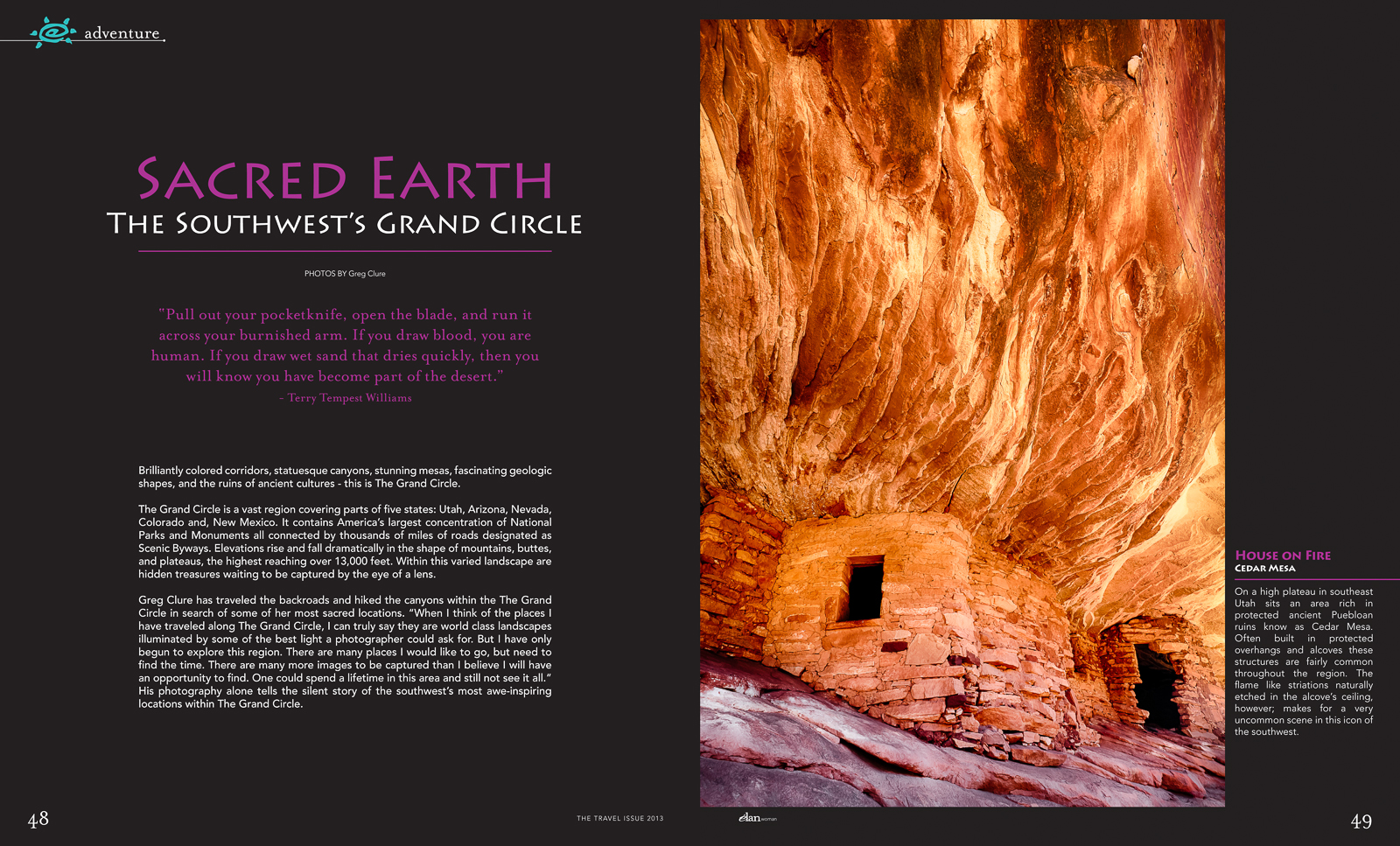
Elan Magazine features 7 of My Images

Opening Two-Page Spread of "Sacred Earth, The Southwests Grand Circle"

Seven of my images are currently featured in the May-June 2013 Issue of Elan Magazine's article "Sacred Earth, The Southwest's Grand Circle", a regional southwest publication. You can view all six pages in my Awards & Recognition Gallery. The "Grand Circle" is a vast and beautiful region located in the Southwestern United States. Encompassing portions of five states – Arizona, New Mexico, Colorado, Utah and Nevada – the Grand Circle contains America’s largest concentration of national parks and monuments, woven together by extraordinary designated Scenic Byways. Some of America’s most diverse scenery can be found within the Grand Circle – the Grand Canyon, Zion National Park, Bryce Canyon, Lake Powell and Arches National Park, just to name a few. Bold splashes of color, fascinating geologic shapes and the mysterious remnants of cultures await you at every turn.